|
There are several ways to connect your radio to your Pocket PC. This page will explore a few of these options.
Direct serial connection
This method is the easiest, but may not be available on newer Pocket PC
devices because they don't support so called "legacy" ports. To connect your
radio using the direct connection method, you will need the following:
- Serial adapter cable for your radio (Yaesu CT-62, Icom CI-V, etc)
- Serial adapter cable for your Pocket PC
- Null modem and gender changer adapters as needed
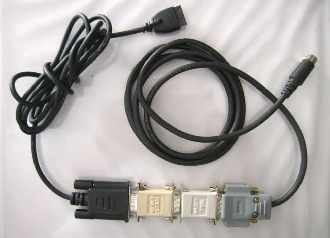
An serial cable for a Yaesu FT-817 is show below.
There are several disadvantages to using a serial connection, most notably,
you are tethered to your radio. An forget portability, your serial port
hardware/cables takes up more room than your PPC! Serial connections also tend to radiate RF noise
from the Pocket PC which can cause problems when using a nearby antenna on the
radio.
Bluetooth Connection
The next method involves using CTR-BlueLync. This option provides a simple
method to connect your Pocket PC to your radio using wireless
Bluetooth technology. With this method, you are not
tethered to your radio. With CTR software and CTR-BlueLync
you can control your radio from
distances of at least 100 meters (300 feet) or more. This method is ideal for
man-pack or mobile operation, or controlling a radio in the house. You can order
a BlueSMiRF module with an external antenna if you need even greater range. This
method
provides connectivity for Pocket PC devices that do not support legacy serial
ports.
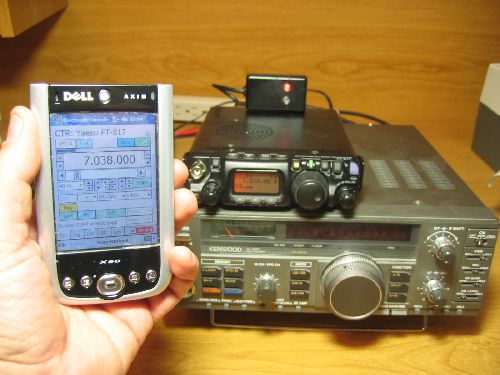 This photo shows a FT-817 connected to a Dell X50 Pocket PC via a
Bluetooth link. This photo shows a FT-817 connected to a Dell X50 Pocket PC via a
Bluetooth link.
CTR-BlueLync interfaces can be connected to all the
radios in your shack and CTR-Remote can selectively
control any of them by selecting the specific interface at connection time.
The CTR-BlueLync interface can also provide connectivity for many PC based radio
control programs such as CTR-PC using Bluetooth wireless technology PC's,
notebooks, and tablets.
Icom PCR1000 Users take note!
CTR-BlueAir will not work with any other Icom
PCR1000 program. This is because PC based programs
automatically ramp up the baud rate from 9600 to 38.4 kbaud when connecting. The
command to ramp up will reset the radio's baud rate but not CTR-BlueAir's baud
rate and your program will fail to connect.
TCP/IP Connection
Most Pocket PC's use Microsoft ActiveSync to synchronize their data with the
host PC. ActiveSync establishes a TCP/IP network connection between the PC and
the Pocket PC. You can use this connection to control your radio with
CTR-Remote. If you have a Wi-Fi network, you can use it to provide a TCP/IP
portable connection.
TCP/IP requires a separate
program, called a port server, running on your PC.
CTR-Server
is such a program and is available free to registered users of
CTR control software.
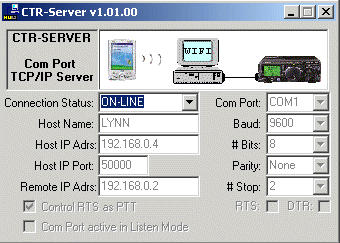
CTR-Server maps a serial port
on your PC to a TCP/IP connection. Connect your radio to your PC's serial port in the
usual manner. Your CTR control software can then
access that serial port over the
TCP/IP network to
establish a connection with the radio.
If your network is properly configured, this method also allows allows you to
access your radio across the Internet.
The disadvantage of TCP/IP is that you must have a PC near your radio and it
must be running a server program to provide this connection.
Remote Audio Options
One of the most exciting options in the area of remote radio control is
remote audio. With remote control and audio connections to your radio, you can
escape the shack while still monitoring band conditions, calls on the repeater,
etc.
You literally have your radio in the palm of your hand.
There are several ways to provide remote audio to and from your radio.
Wi-Fi Remote Audio
If you have a Wi-Fi network in your shack you can easily setup a remote audio
link using Microsoft's Portrait software. This software is free and provides
bi-directional audio between your Pocket PC and the host computer. It requires
no additional hardware. Transmitter control can be enabled using VOX. For more
information on configuring this option, visit our
Remote Audio page.
Other Remote Audio Methods
There are several other methods available to provide remote audio without the
need of a PC and Wi-Fi network.
For monitor only, you could use an FM broadcast module (sold to transmit CD
and iPods audio to FM radios) to transmit received audio. This requires a
separate FM receiver.
For bi-directional remote audio, you could use 70 cm portables to provide the
remote link. Cordless phones are another possibility.
Unfortunately, at the present time,
audio is not supported on the CTR-BlueAir module, however, there are
wireless audio devices on the market that can
provide this function.
|





